The Google Nest Doorbell (Wired, 3rd Gen) is the best doorbell for Google Home, thanks to sharp video and smooth smart alerts.
A doorbell camera should make daily life easier. You want to see a visitor, speak to a delivery driver, or check a package without opening the door. Yet many models work better with Alexa than with Google Home. I compared the latest Google Nest Doorbell models, wired and battery options, plus a useful Wi-Fi chime. My picks focus on Google Home control, video quality, alerts, setup, power needs, and long-term value.
See the differences between my top picks at a glance.
Google Nest Doorbell Wired 3rd Gen

The Google Nest Doorbell Wired 3rd Gen is my top pick for most homeowners. It offers a wired power connection, so you do not need to remove the unit for charging. The 2K video helps show faces, packages, and small details near the entry. Its live view also fits naturally into the Google Home app.
This model makes the most sense when your home already has doorbell wires. A wired setup can provide a more dependable daily routine than a battery unit. The Snow finish looks clean and bright against many doors and walls. If you want the best doorbell for Google Home with strong video and low battery upkeep, this is the model I would start with.
Pros:
- Sharp 2K video for clearer detail
- Wired power avoids regular charging
- Works naturally with the Google Home app
- Supports live viewing from compatible smart displays
- Clean Snow finish suits many entryways
- Good choice for frequent visitors and deliveries
Cons:
- Needs an existing wired doorbell setup or new wiring
- Higher installation effort than a battery model
- Some advanced features may depend on a Google subscription
What Amazon Buyers Are Saying
Buyer feedback commonly focuses on the clear image, stable wired power, and simple connection with Google Home. Many owners like checking the front door from a phone or smart display. Review patterns also show that installation depends on the condition of existing wiring. Some buyers mention setup steps, Wi-Fi strength, or subscription features as points to review before purchase.
My Recommendation
I recommend this model for homeowners who want the strongest mix of image quality, smart-home control, and low upkeep. Confirm that your current transformer and wiring meet the product requirements before ordering. It is worth buying for a permanent installation and earns my highest rating in this guide.
Google Nest Doorbell Wired 3rd Gen Linen

The Linen version uses the same core wired design as the 3rd Gen model above. Its main difference is the warmer, light fabric-inspired color. That small detail can matter when the doorbell sits beside cream paint, wood, stone, or a pale entry door. You still get 2K video and a live view for daily front-door checks.
I see this as a style-led choice rather than a performance upgrade. The wired design suits people who do not want charging breaks. Google Home users can place the camera beside other smart-home devices in the same app. If you like the feature set but dislike a bright white doorbell, the Linen finish offers a softer look.
Pros:
- 2K video supports useful detail
- Reliable wired power for fixed installations
- Linen finish blends with light-colored exteriors
- Google Home app support keeps controls in one place
- Live view helps with deliveries and visitors
- Good fit for a neat, low-maintenance setup
Cons:
- Requires wired installation
- Color may not suit dark doors or bold trim
- Some smart alerts may require a paid plan
What Amazon Buyers Are Saying
Amazon buyer comments often praise the clean appearance and the way the doorbell fits into a Google Home setup. Buyers also discuss image clarity and the usefulness of remote viewing. As with other wired models, installation and transformer compatibility appear as common concerns. Some customers also want to understand which history and alert tools work without a subscription.
My Recommendation
Choose this version when the Linen color matches your home better than Snow. It gives you the same basic strengths as the other 3rd Gen wired colors. I would buy it for a light entryway where appearance matters as much as camera performance.
Google Nest Doorbell Wired 3rd Gen Hazel
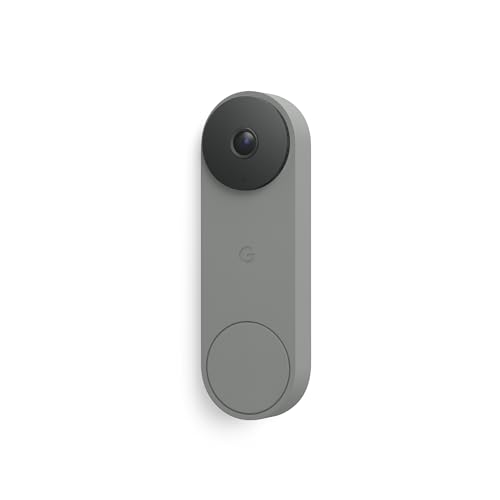
The Hazel version gives the 3rd Gen wired Nest Doorbell a deeper, warmer look. It keeps the same practical idea: sharp 2K video, live viewing, and Google Home control in a hardwired design. The color can work well with wood doors, brown trim, brick, and earthy exterior colors. It also avoids the need to track battery levels.
This is a good example of how product color can affect the buying decision. The camera features matter most, but the doorbell stays visible all day. A finish that matches your home can make the installation look more planned. I would consider Hazel when you want the best doorbell for Google Home in a color that feels less stark than white.
Pros:
- Detailed 2K video
- Continuous wired power
- Warm Hazel color suits wood and brick
- Works with Google Home controls
- Useful live view for front-door checks
- No routine battery charging
Cons:
- Needs compatible doorbell wiring
- Professional help may add installation cost
- Advanced cloud tools can add ongoing cost
What Amazon Buyers Are Saying
Review themes for this family of wired Nest Doorbells include praise for the picture, Google integration, and always-ready design. Buyers often like the ability to view the entrance while away. The most common cautions relate to setup, Wi-Fi quality, and checking the exact subscription terms. Color feedback is personal, so I suggest comparing Hazel with your door trim before ordering.
My Recommendation
Hazel is a strong buy when its color fits your exterior. It offers the same useful core features as the Snow and Linen versions. I rate it highly for homeowners who want a permanent Google Home doorbell and care about a warmer visual style.
Google Nest Doorbell Battery Ash

The Google Nest Doorbell Battery is a flexible choice for homes without an easy wired connection. The Ash finish has a soft gray look that fits many modern doors. Its battery design can make installation simpler because you do not need to connect it to existing doorbell wires. You can view the entrance and manage alerts through Google Home.
Battery power adds freedom, but it also adds a task. Cold weather, busy motion areas, Wi-Fi strength, and alert settings can affect how often charging becomes necessary. I like this model for renters, older homes, and users who want to avoid electrical work. It is one of the easiest ways to add a Google Home-compatible doorbell camera.
Pros:
- Flexible placement without hardwiring
- Ash color suits gray and neutral exteriors
- Google Home app integration
- HDR video helps manage bright and dark areas
- Useful option for renters and older homes
- Simple concept for first-time smart-camera buyers
Cons:
- Requires charging over time
- Battery life can vary with weather and activity
- Battery models may respond differently in very cold conditions
What Amazon Buyers Are Saying
Buyers often like the simple installation and the lack of doorbell wiring. Many also value the ability to speak with visitors from the app. Common complaints in battery doorbell reviews include charging frequency, connection issues, and delays caused by weak Wi-Fi. These points do not affect every home, but they show why placement and network strength matter.
My Recommendation
I recommend the Ash battery model when you want easy installation and do not have suitable wiring. It is not my first choice for a busy entrance if you want to avoid charging. Still, it offers strong convenience and earns a good rating for flexible home security.
Google Nest Doorbell Battery Snow

The Snow battery model offers the same basic battery-powered approach in a bright finish. It can suit homes that lack wired doorbell power or users who want a less permanent installation. The camera connects to Google Home for viewing, alerts, and two-way communication. Its light color is easy to notice and pairs well with white or pale trim.
I would choose this model when installation freedom matters more than continuous power. It can help avoid a wiring project, which may be useful in a rental or an older property. Before buying, think about how often people pass your door. A busy walkway can lead to more activity and may mean more frequent charging.
Pros:
- No fixed wiring required for installation
- Bright Snow finish looks clean on light doors
- Google Home compatibility
- HDR video supports changing light conditions
- Two-way talk helps with visitors and deliveries
- Good fit for flexible placement
Cons:
- Needs periodic battery charging
- High activity can reduce time between charges
- May need careful placement for stable Wi-Fi
What Amazon Buyers Are Saying
Amazon buyers commonly mention easy mounting and useful remote access. The battery design receives positive comments from people who could not use existing doorbell wires. Review concerns tend to focus on battery expectations, wireless connection, and app setup. I suggest reading current customer feedback for your climate and checking the latest battery guidance before purchase.
My Recommendation
This is a practical choice for a light-colored entryway without simple wiring. Buy it if you accept the need to monitor and recharge the battery. For many renters, it remains a better fit than a wired camera that requires electrical work.
Wi-Fi Chime for Google Nest Doorbell

This plug-in Wi-Fi chime is an accessory rather than a camera doorbell. It is designed for users who want an indoor sound from a Nest Doorbell. The listing highlights 32 ringtones and five volume levels. Those settings can help you choose a sound that fits your home and set a louder level in a large room.
A chime can solve a simple problem: phone alerts are easy to miss. It can also help households where not everyone uses the Google Home app. Compatibility deserves careful attention, so check the current listing and your doorbell model before ordering. I see this as a useful add-on, not a replacement for a Google Nest camera.
Pros:
- Provides an extra indoor alert
- Offers 32 ringtone choices
- Includes five volume levels
- Useful when phone notifications are missed
- Plug-in design avoids another battery to charge
- Can help larger homes hear the doorbell
Cons:
- It is not a doorbell camera
- Compatibility should be checked before buying
- Uses an indoor outlet
What Amazon Buyers Are Saying
Buyer discussions for this type of accessory usually focus on sound level, tone choice, and setup. Users who miss phone alerts may find a dedicated indoor chime helpful. Some customers may expect a universal device, so checking compatibility is important. Placement also affects how well the sound carries through walls and rooms.
My Recommendation
I recommend this chime for homes where people often miss mobile alerts. It makes the most sense as an add-on to a compatible Nest Doorbell. I would not buy it as a standalone security device because it does not provide video or visitor communication.
Google Nest Doorbell Battery Ivy

The Ivy version gives the battery Nest Doorbell a darker, natural-looking finish. It is a good match for dark green, gray, brown, or wood-toned entryways. Like the other battery colors, it avoids the need to connect the camera to existing doorbell wiring. Google Home keeps the controls, video, and alerts in one familiar place.
The main buying decision here is practical placement. A battery doorbell needs a strong Wi-Fi signal and a location that gives a clear view of the approach. Ivy may also draw less visual attention on a darker door. I would pick it for a flexible installation where a hardwired 3rd Gen model does not fit the home.
Pros:
- Wireless installation offers placement freedom
- Ivy finish suits dark and natural exterior styles
- Google Home app support
- HDR video helps with mixed lighting
- Two-way talk supports remote visitor contact
- Useful for homes without convenient wiring
Cons:
- Requires battery charging
- Heavy motion activity can affect battery duration
- Wireless performance depends on network strength
What Amazon Buyers Are Saying
Amazon review patterns commonly praise the wireless setup and the ability to answer the door from a phone. The Ivy color appeals to buyers who want a less bright front-door device. Battery timing and Wi-Fi connection remain the main areas of concern. Those results can differ by climate, door traffic, and router distance.
My Recommendation
I recommend Ivy when its color fits your entryway and you need battery power. It is a useful choice for renters or homes where rewiring is not practical. Pick a wired model instead if you want the least maintenance possible.
Google Nest Doorbell Wired
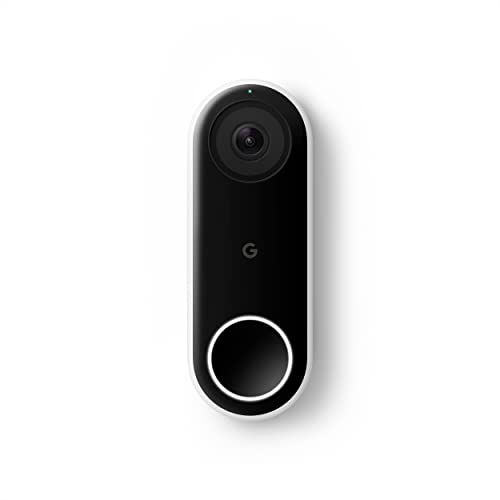
The Google Nest Doorbell Wired, formerly known as Nest Hello, remains a useful option for buyers who want a hardwired Nest camera. Its feature list includes HD video, HDR, night vision, two-way talk, person alerts, and 24/7 streaming. A wired connection supports constant availability without routine battery charging. It also fits well with a Google-centered smart-home system.
This model is worth considering when continuous streaming matters more than the newer 2K format. It can suit a home with existing Nest equipment and a compatible wired setup. Since it is an older design than the 3rd Gen model, I would compare current prices and features before deciding. It may offer good value when sold at a clear discount.
Pros:
- 24/7 streaming capability
- Wired power removes charging duties
- HDR video and night vision
- Person alerts support useful awareness
- HD two-way talk
- Strong fit for existing Nest users
Cons:
- Older design than the 3rd Gen wired model
- Video resolution is listed as HD rather than 2K
- Requires wired installation
- Some features may depend on a subscription
What Amazon Buyers Are Saying
Buyers often value the always-on wired design, clear night view, and integration with the Nest ecosystem. The 24/7 stream is a major reason some people choose this model. Common concerns include installation, account setup, and comparing older hardware with newer Nest options. Price becomes especially important because this product competes with newer models.
My Recommendation
I recommend it for existing Nest users who specifically want 24/7 streaming and find a good price. New buyers should compare it closely with the 3rd Gen wired model. It remains capable, but it is not my first choice for the best doorbell for Google Home in 2026.
How to Choose the Best Doorbell for Google Home
Choosing the best doorbell for Google Home starts with your home, not just the camera. Look at power, Wi-Fi, video needs, alert features, and the total cost. A model that works well for a wired house may not suit a rental. Use these three checks before you buy.
1. Match the Power Type to Your Entryway
First, decide between wired and battery power. A wired Nest Doorbell needs suitable wiring and a compatible transformer. In return, it avoids regular charging and suits busy doors. A battery Nest Doorbell offers easier placement, but you must plan for charging.
Renters often prefer battery models because they can avoid electrical changes. Homeowners with good wiring may prefer the 3rd Gen wired model. Also think about weather. Very cold conditions can affect battery behavior, so check the current product guidance for your area.
2. Check Google Home Features and Video Needs
Google Home support should feel simple. You should be able to view the camera, receive alerts, and talk with visitors from the app. If you own a compatible Google smart display, check how the doorbell works with that device. A strong Wi-Fi signal also matters more than many buyers expect.
For sharper detail, the 2K 3rd Gen wired models are the leading choices in this group. The older wired Nest Doorbell offers HD video, HDR, night vision, and 24/7 streaming. Decide whether sharper resolution or continuous recording matters more to you. Also review the current subscription terms for cloud history and advanced alerts.
3. Compare Total Value, Setup, and Daily Upkeep
Do not judge value by the camera price alone. Include installation, a possible transformer, a subscription, and any extra chime. A wired model may cost more to install but require less daily care. A battery model may cost less to mount but need charging.
Look at the entryway view before you order. The camera should face the path, packages, and visitor area without aiming at a bright light. If people in your home miss phone alerts, a compatible indoor chime may add real value. Finally, choose a finish that fits your door, because the camera will remain visible every day.
Final Verdict: Which Should You Buy?
The Google Nest Doorbell Wired 3rd Gen is my top choice and the best doorbell for Google Home overall. It combines 2K video, live view, wired reliability, and simple Google Home control.
Choose a battery model for easier installation, or the older wired model for 24/7 streaming. Check power, Wi-Fi, subscriptions, and current Amazon pricing before you buy.
FAQs Of best doorbell for google home
What is the best doorbell for Google Home?
The Google Nest Doorbell Wired 3rd Gen is the best overall choice. It offers 2K video, live viewing, wired power, and strong Google Home integration.
Is a wired or battery Nest Doorbell better?
A wired model is better for low upkeep and frequent activity. A battery model is better when wiring is missing or installation must stay simple.
Does the Google Nest Doorbell work with Google Home?
Yes. Google Nest Doorbell models are designed to work with the Google Home app for viewing, alerts, and two-way communication.
Do Google Nest Doorbells need a subscription?
Some basic functions work without a subscription, but certain video history and advanced alert features may require a paid Google service. Check current plan details before buying.
Can I use a chime with a Google Nest Doorbell?
You may use a compatible Wi-Fi chime to add an indoor sound. Confirm that the chime supports your exact Nest Doorbell model before ordering.